
When I started working with EBL, I often heard something like:
“Load the GDSII file and write the pattern.”
It sounds very simple.
We make the pattern in CAD, export the GDSII file, load it into the EBL software and then the electron beam writes it.
But recently I started thinking about what is actually happening between these two points.
A GDSII file is just digital data.
The electron beam is a physical beam moving inside an electron column.
So how does a rectangle sitting inside a GDSII file finally become a movement of the electron beam on the wafer?
That is what I wanted to understand.
Let’s Start With Only One Rectangle
Instead of thinking about a complete chip or a complicated GDSII file, let’s take one simple pattern.
Suppose my GDSII contains one rectangle:
Length = 10 µm
Width = 100 nm
At this point, it is only a digital shape.
The GDSII file contains information about its geometry and coordinates.
Something like:
There is a rectangle of this size at this location.
But the electron beam cannot directly understand:
“10 µm × 100 nm rectangle.”
The writing system somehow has to convert this digital geometry into information that the EBL hardware can actually use.
Step 1 — The Software Reads the GDSII Structure
The first job is understanding what is inside the GDSII file.
A real GDSII file may contain:
- polygons
- layers
- cells
- references
- repeated structures
- coordinates
For example, if the same structure appears 100 times, the GDSII file does not necessarily need to contain 100 completely independent copies.
It can contain a cell and references to that cell.
So the pattern-processing software first has to understand the layout hierarchy.
It needs to know:
What shapes exist?
Where are they located?
Which cells are being referenced?
Which layer contains the pattern we want?
At this point, we are still dealing with design information.
The electron beam has not started writing anything.
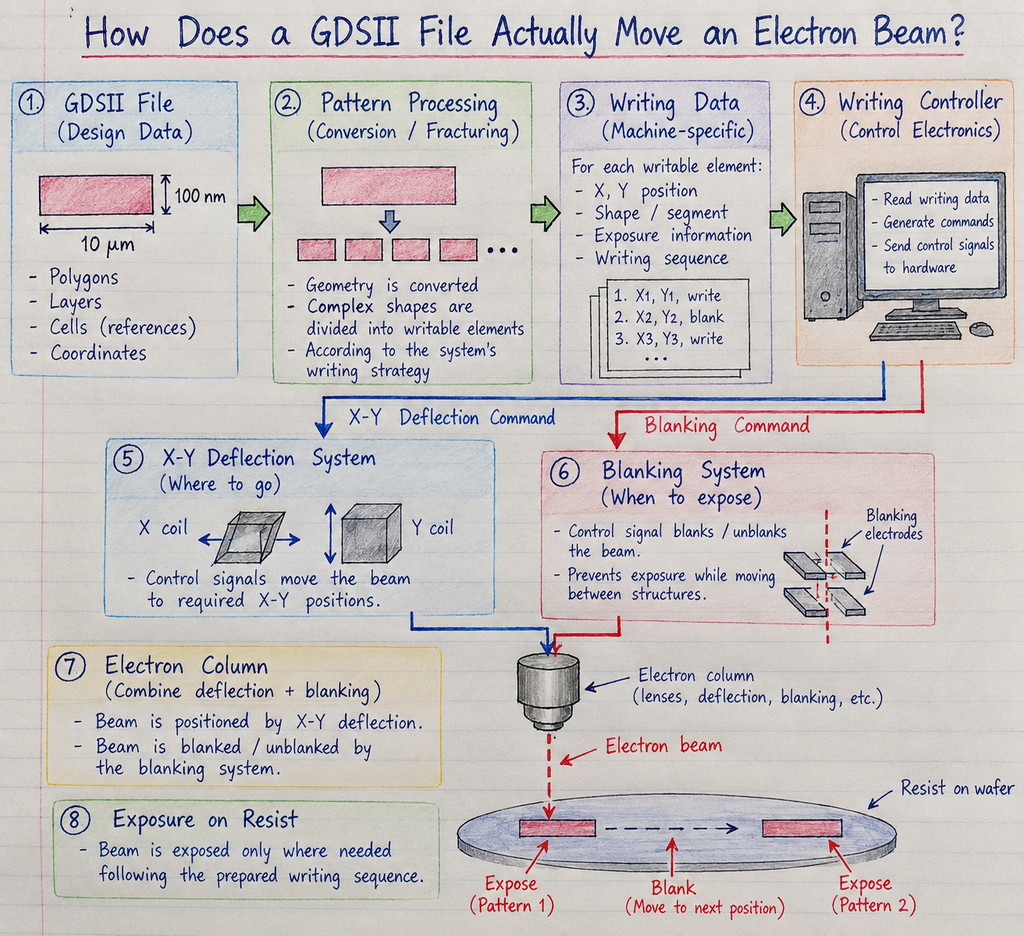
Step 2 — The GDS Geometry Has to Become Writable Geometry
Now let’s return to our rectangle.
10 µm × 100 nm
The computer knows what the rectangle looks like.
But the writing system needs to know how that area will actually be exposed.
This is where pattern conversion becomes important.
For more complicated geometries, we may also hear the word:
Fracturing.
This was a new word for me when I first came across it.
The easiest way I understand it is:
A complicated design shape may need to be broken into simpler writable elements that the writing system can handle.
Imagine that instead of our simple rectangle, the GDS contains an irregular polygon:
        ┌────────────┐
        │            │
   ┌────┘            │
   │                 │
   │       ┌─────────┘
   │       │
   └───────┘
The design software can describe this as one polygon.
But the EBL writing system may process it into a number of simpler writable elements.
Conceptually:
Original polygon
↓
Pattern conversion / fracturing
↓
┌──────┐ ┌───────────┐
│      │ │           │
│      │ │           │
└──────┘ └───────────┘

       ┌──────┐
       │      │
       └──────┘
The exact way this happens depends on the EBL system and its software.
The important thing is that the original CAD geometry is being changed into a representation suitable for writing.
Step 3 — GDSII Is Not Necessarily the Final Machine Language
This was probably the most interesting part for me.
I used to think:
GDSII goes into the machine → beam writes GDSII.
But that is too simple.
GDSII is a layout format.
After pattern processing, the system may create or use machine-specific writing data that contains the information needed by that particular writing system.
So we can think of the process as:
GDSII
↓
Pattern-processing software
↓
Converted / fractured pattern
↓
Writing data understood by the EBL system
The exact intermediate format is not the same for every manufacturer.
That is why I don’t think we should imagine GDSII itself directly controlling the electron beam.
There is a translation step in between.
Step 4 — Now We Have Digital Writing Instructions
After pattern preparation, the system has much more useful information.
Instead of only knowing:
“There is a rectangle here.”
the writing system now has information that can be used to control the exposure.
At a simplified level, it needs to know things like:
Where should the beam go?
Which part should receive exposure?
When should the beam stop exposing?
Where should it move next?
Our original rectangle is slowly changing from a CAD object into a sequence of physical writing actions.
But there is still another problem.
These instructions are digital.
The electron beam is physical.
So how does digital information actually move the beam?
Step 5 — Writing Data Goes to the Control Electronics
Somewhere between the software and the electron column, the digital writing information has to become electrical control signals.
A simple way to picture it is:
GDSII
↓
Pattern conversion
↓
Writing data
↓
Writing/control electronics
↓
Electrical control signals
↓
Electron-beam control
This is the bridge between the software world and the physical machine.
The exact electronics are system-specific, so I don’t want to say that every EBL machine has exactly the same architecture.
But the basic idea is important.
The coordinates stored in a computer eventually have to become signals that control where the electron beam goes.
Step 6 — How Does the Beam Move in X and Y?
Now we finally reach the electron column.
The beam has to move across the required positions on the sample.
This is where the beam deflection system becomes important.
Very simply, we can think about having control in two directions:
X direction and Y direction
By controlling the deflection system, the electron beam can be positioned at different locations inside its writing range.
So:
Digital X-Y position
↓
Control electronics
↓
Deflection signals
↓
Beam moves to the required X-Y position
This is the point where the coordinates that started inside our GDSII file begin to become actual physical beam positions.
That connection is what I had never really thought about before.
Step 7 — But How Does the Beam Move Without Writing Everywhere?
Now imagine that our GDSII contains two rectangles:
████████ ████████We want to expose the first rectangle.
Then the beam needs to move to the second rectangle.
But we do not want to expose this area:
████████------------------████████
        DON'T WRITE HERE
If the beam simply stayed active while moving, it could expose unwanted resist between the two patterns.
This is where beam blanking becomes important.
Step 8 — Beam Blanking
The easiest way I understand beam blanking is:
We don’t necessarily turn the electron source itself ON and OFF every time we move between two patterns. Instead, the system prevents the beam from exposing the sample when exposure is not required.
Conceptually:
Expose first shape
↓
Blank
↓
Move beam
↓
Unblank
↓
Expose second shape
So:
WRITE → BLANK → MOVE → UNBLANK → WRITEThis allows the beam to move between different writing locations without intentionally exposing everything along the path.
Now the system has two very important controls:
Deflection → WHERE should the beam go?
Blanking → WHEN should the sample receive exposure?
That made the writing process much easier for me to visualize.
Step 9 — Does the Beam Simply Trace the Rectangle?
This is another thing I originally imagined incorrectly.
If my GDS contains:
┌────────────────────┐
│                    │
│                    │
└────────────────────┘
I imagined the beam behaving like a pen:
Start at one corner → follow the border → finish the rectangle.
But if the rectangle represents an area that needs exposure, simply drawing the border is obviously not the same as exposing the required area.
The writing system uses its writing strategy to expose the required geometry.
That is another reason why pattern conversion is important.
The system is not just copying the visual appearance of the GDS.
It is converting the design into something that can physically be exposed by the electron beam.
Different EBL systems can use different writing strategies, so I don’t think it is correct to describe one method as universal.
The main idea is enough:
The GDS describes the geometry. The writing system decides how that geometry is represented and executed as an electron-beam exposure.
Following Our Rectangle From Start to Finish
Now let’s follow our original:
10 µm × 100 nm rectangle
one more time.
1. CAD
I draw the rectangle.
↓
2. GDSII
The rectangle is stored as digital geometry with coordinates and layer information.
↓
3. GDSII is loaded
The pattern-processing software reads the layout structure.
↓
4. Pattern processing
The selected geometry is converted into a form suitable for the writing system.
If required, geometry is fractured into simpler writable elements.
↓
5. Writing data is produced
The system now has information that can actually be used for the exposure.
↓
6. Control electronics receive the writing instructions
Digital position and writing information are translated into the control signals required by the machine.
↓
7. Deflection system controls beam position
The electron beam is moved to the required X-Y locations.
↓
8. Blanking controls exposure between structures
The beam is allowed to expose where required and prevented from exposing where it is not required.
↓
9. Electron beam exposes the resist
The digital rectangle has now become an actual electron exposure on the physical sample.
That is the connection I was looking for.

Leave a Reply